Last updated on November 2nd, 2026 at 02:41 pm
What are project artifacts? Learn the types of artifacts in project management, with clear examples and their purposes, to manage projects effectively.
Table of Contents
Project management involves more than assigning tasks, creating schedules, and meeting deadlines. Project managers also need accurate information to make the right decisions, handle unexpected risks, communicate with stakeholders, and monitor project progress. This is where project management artifacts are important.
Project management artifacts are documents, records, charts, templates, and other information created or used while managing a project. Common examples include project charters, project plans, Gantt charts, risk registers, and schedule or status reports. These artifacts help project managers organize project tasks, track performance, maintain accountability, and ensure everyone involved understands what needs to be accomplished.
What Are Artifacts in Project Management?
As we discussed earlier, Artifacts in project management are digital records or tangible tools that capture project-related decisions, activities, and deliverables and remain relevant throughout the project. Therefore, project artifacts can take many forms, including documents, templates, models, charts, graphs, plans, or any other record that provides valuable project information.
The PMBOK 8th edition defines project artifacts as “ A document or other item created during a portfolio, program, or project to help manage it and provide information to the project team, stakeholders, and management.”
For example: Imagine you’re managing a website development project. You need to clearly define project objectives, divide project tasks and break them down into smaller steps, identify appropriate stakeholders, estimate costs, and monitor deadline and communication progress. To manage these activities, you might create the following artifacts.
| Artifacts | Main Purpose |
| Project charter | To define the project’s objectives and authorization |
| Stakeholder register | To identify people involved in the project |
| Work breakdown structure | To divide the project into manageable tasks |
| Risk register | To identify potential problems |
| Gantt chart | To organize the project schedule |
| Status report | To communicate progress |
What Is the Purpose of a Project Artifact?
The main purpose of project artifacts is to provide essential information that supports the project throughout the project life cycle. These artifacts help the team answer important questions, as below.
- What are we trying to achieve?
- Who is responsible for each project activity?
- What project resources do we need?
- What kind of risks could affect the project?
- Are we completing activities on project schedule?
- What changes have been made?
- What decisions have stakeholders approved?
By maintaining the right information, the project manager can minimize misunderstandings and make more informed decisions.
Types of Artifacts in Project Management
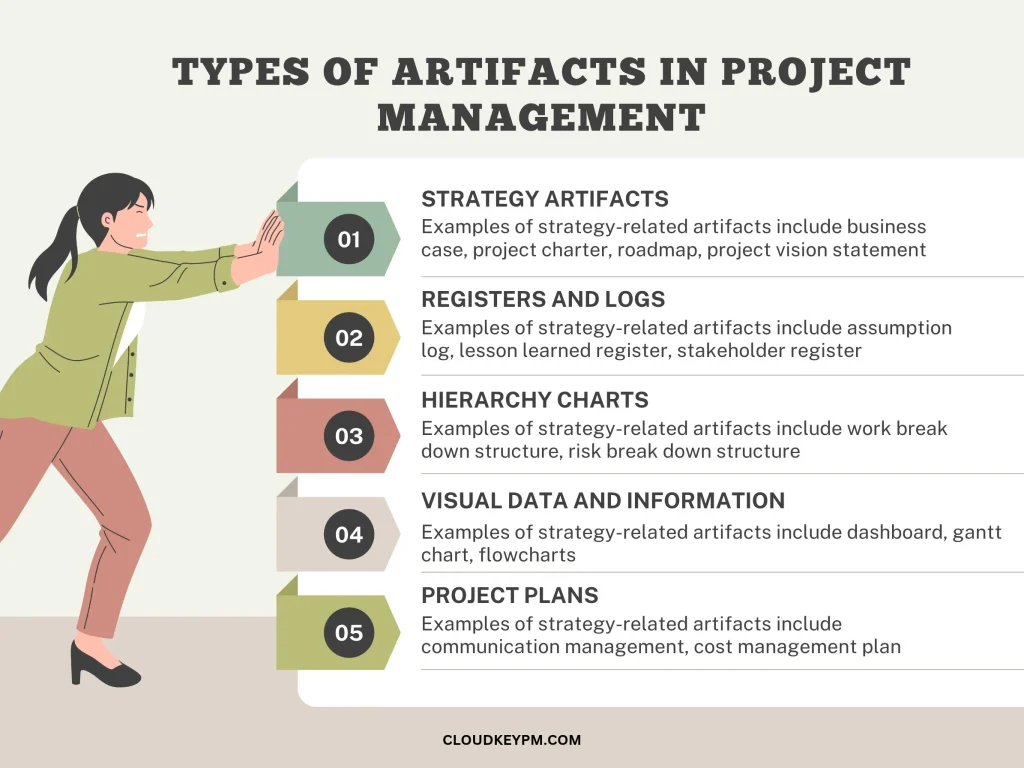
The PMBOK 7th edition identifies nine types of project artifacts: strategy, logs and registers, plans, hierarchy charts, baselines, visual data and information, reports, agreements and contracts, and others. But the PMBOK 8th edition presented them as a comprehensive set of documents and items used to support project activities, rather than organizing them into perspective categories. This 8th edition no longer groups artifacts under fixed headings.
The following artifacts remain central to effective project management and are widely used across project and deliverable approaches.
- Strategy-related artifacts
- Registers and logs
- Hierarchy charts
- Project plans
- Visual data and information
- Baselines
- Project reports
- Project contracts and agreements
- Other artifacts
Let’s explore each one, its purpose, common examples, and how project managers use it.
- Strategy-Related Artifacts
Strategy-related artifacts involve high-level information about a project’s business purpose, direction, objectives, and expected value. These artifacts help project teams understand why a project is being undertaken and what it is expected to achieve. These are also important during project initiation because they provide the foundation for project authorization and decision-making.
Common examples of strategy-related artifacts include:
- Business case – explains why a project is necessary and evaluates its expected benefits, costs, risks, and business value.
- Project brief – Provides a clear summary of the project’s objectives, scope, requirements, and key information.
- Project charter – Provides formal authorization to the project and establishes the project manager’s authority within the agreed organizational context.
- Project vision statement – Explains the desired project future outcomes and overall direction of the project.
- Roadmap – Provides a high-level view of major milestones, planned activities, and expected progress over time.
- Logs and Registers
Logs and registers are the documents that help project managers record information that changes or develops throughout the project. These artifacts also require regular updates because project conditions, risks, issues, decisions, and requirements can change.
Common examples of logs and registers artifacts include:
- Assumption log – Record assumptions that may need validation.
- Lessons learned register – Document knowledge and experiences gained during the project.
- Risk register – Record potential risks, their probability, impact, owners, and planned response strategies.
- Stakeholder register – Identify project stakeholders and record their roles, interests, and involvement.
- Backlog, change log –
- Issue log – Document project problems that have already occurred and require attention or resolution.
- Risk-adjusted backlog – Involves prioritizing work items, requirements, or activities that need to be completed.
- Hierarchy Charts
Hierarchy charts represent project information through structured levels or relationships. These artifacts help the project manager break down complex information into smaller, more understandable components. They also help organize project tasks, resources, organizational responsibilities, products, and risks.
Common examples of hierarchy charts include:
- Work breakdown structure – Divides project scope into smaller, manageable components.
- Organizational breakdown structure – Shows the organizational structure and relationship between project responsibilities.
- Product breakdown structure – Organizes the project’s product components into a hierarchical structure.
- Risk breakdown structure – Organizes potential project risks into categories and subcategories.
- Resource breakdown structure – Categorizes project resources into different groups.
- Project Plans
Project plans describe how different aspects of the project will be managed and completed. These artifacts also describe how the team will organize work, allocate resources, manage communication, maintain quality, control costs, and handle risks.
Common examples of logs and registers artifacts include:
- Communication management plan
- Change control plan
- Cost management plan
- Procurement management plan
- Quality management plan
- Release plan
- Resource management plan
- Risk management plan
- Scope management plan
- Stakeholder management plan
- Visual Data and Information
Visual data and information artifacts present project information through charts, diagrams, graphs, and other visual formats. These help project stakeholders (both primary and secondary) understand complex information more quickly, such as trends, performance comparisons, and project conditions.
Common examples of logs and registers artifacts include:
- Burndown/burnup chart
- Cumulative flow diagram
- Cause-and-effect diagram
- Dashboards
- Flowcharts
- Histogram
- Project schedule network diagram
- Scatter diagram
- Stakeholder engagement assessment matrix
- Prioritization matrix
- Gantt chart
- Baselines
A project baseline is the approved version of a plan or product that is used to measure and evaluate project performance. These artifacts help project managers compare what was originally planned with what is actually happening. These are also useful for identifying deviations in project scope, schedule, and cost.
Common examples of baselines include:
- Budget
- Project schedule
- Scope baseline
- Performance measurement baseline
- Project Reports
Project reports are used to communicate important information about project activities, performance, risks, and results. These artifacts provide a structured summary of what is happening and help project managers make informed decisions. These can also be prepared regularly or when specific information needs to be communicated.
Common examples of project reports include:
- Quality reports
- Risk reports
- Status reports
- Project Agreements and Contracts
Agreements and contracts define the expectations, responsibilities, obligations, and conditions between parties involved in a project. These artifacts are particularly essential when a project requires external stakeholders such as suppliers, contractors, consultants, or service providers.
Common examples of project agreements and contracts include:
- Fixed-price contracts
- Time and materials
- Cost- reimbursable contracts
- Indefinite delivery, indefinite quantity
- Service-level agreements
- Other Artifacts
These artifacts are commonly used in project management. These support requirements management, activity planning, resource coordination, procurement, and project documentation.
Common examples of other project artifacts include:
- Activity list
- Metrics
- Project calendar
- Project team charter
- User story
- Requirement documentations
Examples of Project Management Artifacts in a Real Project
Imagine your company wants to build a new website to promote its services, attract potential customers, and generate online inquiries. As a project manager, you are responsible for coordinating the team, handling the budget, tracking progress, and ensuring that the website meets the client’s requirements. Here is how different artifacts support the project.
| Project activity | Artifact used | How it helps |
| Define project objectives | Project charter | Establishes purpose and authorization |
| Evaluate business value | Business case | Explains expected benefits |
| Identify stakeholders | Stakeholder register | Record interested parties |
| Organize project work | Work breakdown structure | Breaks work into manageable components |
| Identify potential problems | Risk register | Records and assesses risks |
| Schedule activities | Gantt chart | Organizes activities and deadlines |
| Monitor progress | Dashboard | Displays performance information |
| Record existing problems | Issue log | Track problems requiring resolution |
| Manage requested changes | Change log | Records change requests and decisions |
| Communication progress | Status reports | Updates stakeholders |
| Complete the project | Clouser report | Documents completion and handover |
Why Are Project Artifacts Important in Project Management?
Project artifacts help project managers increase efficiency by organizing work, communicating effectively, identifying problems, and evaluating performance. Let’s discuss why artifacts matter in project management.
- Improve communication between project stakeholders.
A project involves both primary and secondary stakeholders. Without proper documentation, these people may have different understandings of project objectives, requirements, responsibilities, and deadlines. Project artifacts provide a shared source of information through the project charter, communication management plan, and other documents.
- Track project progress and performance
The project manager needs to understand whether project activities are progressing according to the approved plan. Artifacts such as project dashboards, status reports, Gantt charts, and performance baselines allow you to compare planned activities with actual results.
- Identify and manage project risks.
Every project faces uncertainty due to unexpected costs, resource shortages, technical problems, and supplier delays. These can negatively affect the project outcomes. Artifacts such as a risk register help identify potential risks, assess their probability and impact, assign owners, and plan responses.
- Maintain accountability and transparency.
Project artifacts help clarify who is responsible for activities, decisions, and project outcomes. A responsibility assignment matrix and change log make it easier to understand who is responsible for particular activities and decisions.
- Support better project decisions.
Project managers regularly make decisions about budgets, schedules, risks, resources, and changing requirements. Artifacts such as a project status report, baselines, and logs allow project managers to reassign resources, adjust priorities, or discuss a revised deadline with stakeholders.
FAQs
Are Project Artifacts Different from Project Deliverables?
Project artifacts and project deliverables are related, but they are not the same.
- An artifact is a broader term that can include documents, records, templates, outputs, or deliverables,
- A project deliverable is a product, service, result, or outcome produced by a project.
Does the PMBOK 8th Edition Include Artifacts?
Yes, project artifacts support the management of project work and may include documents, templates, outputs, and project deliverables. Rather than following rigid phases, the PMBOK 8th edition frames project management activities around project management focus areas, which align with project life cycle and performance domains.
Conclusion
Project artifacts include strategy, logs and registers, plans, hierarchy charts, baselines, visual data and information, reports, agreements and contracts, and other commonly used artifacts that help project managers organize, manage, and complete the projects successfully.