Last updated on November 18th, 2026 at 02:05 pm
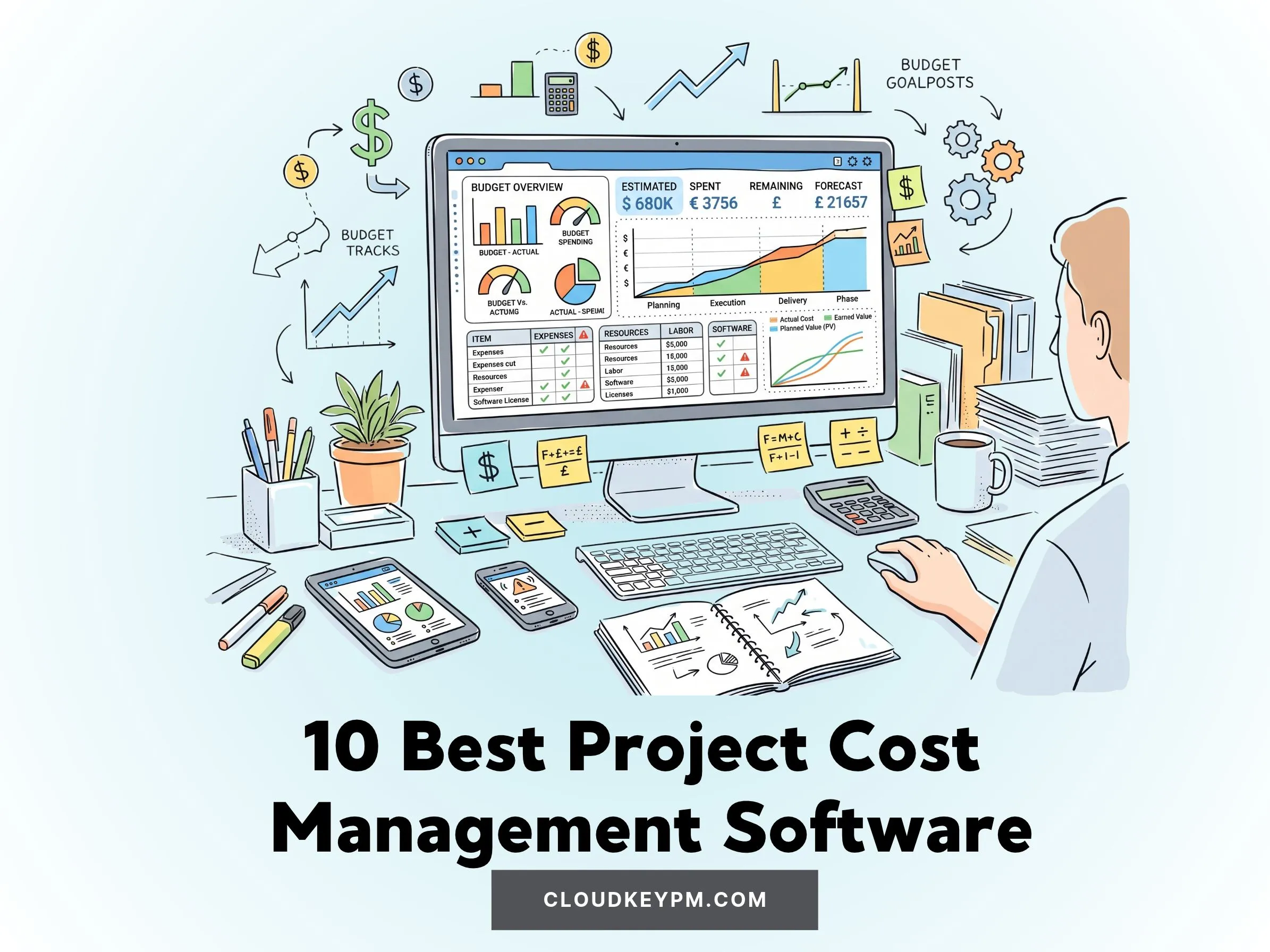
Compare 10 project cost management software tools to manage budgets, monitor expenses, forecast costs, and keep your projects financially on track.
Table of Contents
Managing a project budget involves estimating expenses, monitoring actual spending, allocating resources, tracking labor costs, identifying budget overruns, and forecasting future expenses throughout the project. Without the right tool, these activities become difficult. Why? The project manager may rely on disconnected spreadsheets, manually update expenses, overlook unexpected costs, or discover budget problems too late to take corrective action.
Project cost management software helps project managers simplify these activities by bringing project budgets, resource costs, expenses, and financial reports into one place. It also provides better visibility into where money is being spent and whether the project is progressing within its approved budget.
In this article, we’ll explore the 10 best project cost management software options, compare their features and pricing, explain their advantages and limitations, and help you choose the right solution for your project requirements.
What Is Project Cost Management Software?
Project cost management software is a digital tool that helps you estimate, allocate, monitor, forecast, and control project expenses throughout the project. It also provides crucial financial information, such as labor costs, equipment costs, resource costs, material expenses, and other project expenditures, in a centralized system.
Project managers don’t need to calculate project expenses manually because these tools can automatically compare planned costs with actual spending, identify financial risks, and make informed budget decisions.
Read More: 7 Tools for Cost Management in Project Management
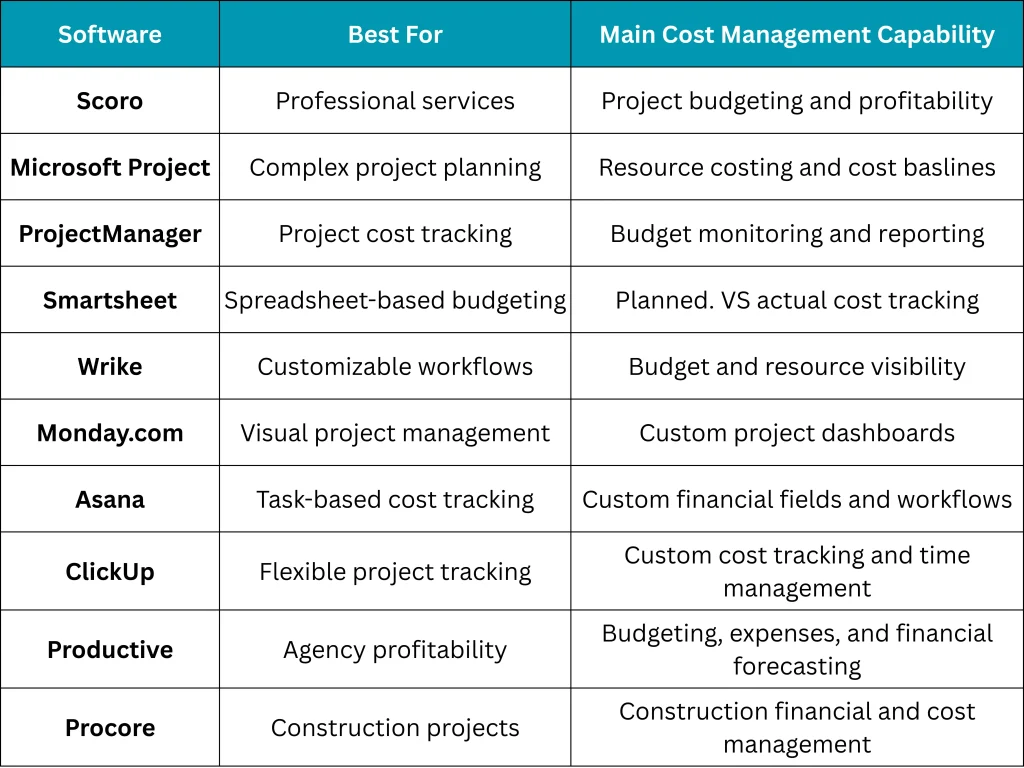
Best Project Cost Management Software Shortlist
- Scoro – Best for project financial management
- Microsoft project – Best for complex project planning and cost control
- ProjectManager – Best for project cost tracking and reporting
- Smartsheet – Best for spreadsheet-based project budget management
- Wrike – Best for customizable project cost workflows
- Monday.com – Best for visual project budget tracking
- Asana – Best for task-based cost tracking
- ClickUp – Best for flexible project cost tracking
- Productive – Best for agency project profitability and forecasting
- Procore – Best for construction project cost management
What Problems Does Project Cost Management Software Solve?
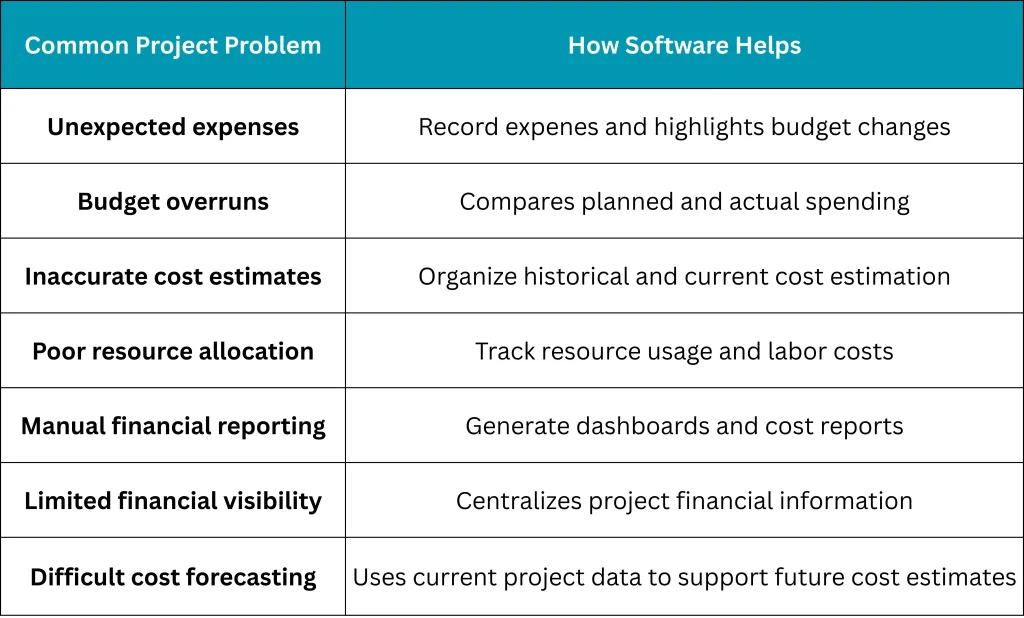
As a project manager, you may often face financial challenges when handling complex projects. Choosing the right cost management software can help address several of them. Important💡 Project cost management software doesn’t automatically prevent every financial problem. You still need accurate data, regular review, and appropriate corrective actions.
Project Cost Management Software
Here are the best project cost management software options that project managers can select according to their needs and requirements.
Scoro Software

Scoro is a professional services automation (PSA) software that consolidates various business functions, including resource planning, project management, quoting and budgeting, invoicing, cost management, time tracking, and reporting and dashboard.
Why Project Managers Picked Scoro for:
As a cost management platform, Scoro enables project managers to create proposals and estimate costs, track expenses to keep them under control, and automate billing and payments in one place. Using this software, project managers can set hourly labor costs for different roles, and logging time against projects helps maintain profitability and effectively control margins. With real-time visibility into project costs, Scoro ensures that projects remain within budget and maximize profitability.
Scoro Standout Features and Integrations:
- Features include a planner, project budgeting, retainer management, timesheet, time locking, tracking of billable time, sales pipeline and report, labor costs, utilization reports, task list and task board, quotes, bill, invoices, receipts, phases and milestones, and Gantt chart and dependencies.
- Integration includes Google Calendar, Microsoft Exchange, Jira, Xero, Exact online, QuickBooks, Saga intacct, Stripe, HubSpot, Salesforce, Google Drive, Dropbox, Okta, and Zapier.
Scoro Pros and Cons:
Pros:
- All-in-one solution: Scoro software integrates project management, invoicing, budgeting, and CRM, reducing the need for multiple software subscriptions.
- Robust project cost management: Track project budget, expenses, and profitability in real time.
- Strong reporting and analytics: Provide custom dashboards for visualizing project progress and costs and provide financial reports, including forecasts and margin analysis.
- Time tracking and resource allocation: Tracks billable and non-billable hours for accurate invoicing.
Cons:
- Expensive for small teams
- Learning curve
- Limited customization
- No free plan
- Mobile app needs improvement
Scoro Pricing:
- Time-billing: $17 per user/month (can customize and free trial available)
- Projects and resources: $ 29 per user/month (can customize and free trial available)
- Quote to cash: $29 per user/month (can customize and free trial available)
- End-to-end: $57 per user/month (can customize and free trial available)
Is Scoro Right for You?
- Best for: Medium to large businesses needing a full project cost management suite. However, it is not ideal for small teams or startups looking for a budget-friendly solution.
Microsoft Project Software

Microsoft Project offers essential tools for planning, tracking, and managing project budgets, helping to keep expenses within the allocated budget through real-time cost tracking and resource management.
Why Project Managers Picked Microsoft Project for:
Project managers prefer Microsoft Project for cost management because it provides detailed budgeting, forecasting, and tracking tools that help control project expenses.
Microsoft Project Standout Features and Integrations:
Features include setting a project budget, resource costing, material and equipment costs, task-based cost allocation, real-time cost monitoring, baseline comparison, cost variance analysis, earned value management, resource rate customization, workload balancing, cost breakdown by resource type, prebuilt cost reports, and a custom cost field.
Integration includes Microsoft Excel, Power BI, Microsoft teams, SharePoint, OneDrive, and Outlook.
Microsoft Project Pros and Cons:
Pros:
- Advanced project planning and scheduling
- Strong cost and resource management
- Seamless integration with the Microsoft ecosystem
- Scalability for large and complex projects
- Customizable reporting and analytics
- Deployment flexibility
- Free trial is available
Cons:
- Steep learning curve (Not beginner-friendly and requires training)
- High cost
- Limited collaboration features
- Resource management complexity
- No built-in time tracking
Microsoft Project Pricing:
- Microsoft planner: Included Microsoft 365 plans
- Planner and project plan 3: $30 per user/month, paid annually (before buy you can try for free)
- Planner plan 1: $10 per user/month, paid annually (before buy you can try for free)
- Microsoft 365 copilot: $30 per user/month, paid annually (open copilot chat available)
Is Microsoft Project Right for You?
- Best for: Large enterprises, experienced project managers, and teams already using Microsoft 365. However, it is not ideal for small businesses, startups, or teams needing highly collaborative tools.
ProjectManager Software

ProjectManager is a project and portfolio management software offering robust cost management features. It provides multiple project views, enabling managers to estimate costs and create budgets using powerful Gantt charts.
Why Project Managers Picked ProjectManager Software:
ProjectManager software is a cloud-based project management tool that offers cost tracking, budgeting, and financial reporting features. Many project managers favor it for cost management because it provides real-time expense monitoring, budgeting tools, and resource cost tracking within an easy-to-use interface.
ProjectManager Software Standout Features and Integrations:
Features include setting project budget, task and resource cost allocation, cost forecasting, monitoring actual costs, comparing planned vs. actual costs, cost variance alert, hourly rate tracking, workload management, time tracking integration, prebuilt budget and cost reports, custom dashboards, and earned value management.
Integration includes Microsoft Excel, Google Sheets, Slack, Microsoft Teams, QuickBooks, and Accounting Tools.
ProjectManager Software Pros and Cons:
Pros:
- Easy budgeting and cost tracking
- Real-time expense monitoring
- Financial reporting and custom dashboards
- Integration with accounting and financial tools
- Cloud-based and easy-to-use
- Free trial is available
Cons:
- Lacked advanced financial features
- Limited customization in cost reports
- No free plan
ProjectManager Software Pricing:
- For team: $15/user/month, billed annually
- For business: $28/user/month, billed annually
- For enterprise: Contact sales for a custom quote
Is ProjectManager Right for You?
- It is best for small—to mid-sized teams that need a simple, real-time cost-tracking solution. However, it is not ideal for large enterprises that need detailed financial forecasting, ERP integration, or multi-currency support.
Smartsheet

Smartsheet is a project management tool that also serves as a collaborative tool and includes some cost management tools. This software helps managers plan, track, and control costs.
Why Project Managers Smartsheet Picked Smartsheet:
Many project managers prefer this software because it offers customizable budget sheets that track estimated and actual costs across various categories. It also allows project managers to track planned versus actual expenditures with real-time updates and expense monitoring. Additionally, some reports offer summaries of financial data, budget status, and cost performance, along with dashboard and resource management features for cost allocation.
Smartsheet Standout Features and Integrations:
Features include prebuilt budget templates, custom formulas and calculations, planned vs. actual cost tracking, conditional formatting for cost alerts, live budget updates, expense logging and approval workflows, cost variance analysis, and earned value management.
Integration includes QuickBooks, Google Sheets, Microsoft Excel, Power BI, Tableau, SPA, and Oracle Netsuit.
Smartsheet Pros and Cons:
Pros:
- Easy-to-use spreadsheet interface includes prebuilt budget templates, familiar Excel-Like layout, custom formulas, and calculations.
- Real-time budget and expense tracking
- Advanced reporting and dashboards
- Automation and collaboration features
- Free plan
- Free trial
Cons:
- Lack of advanced financial forecasting
- Limited accounting capabilities
- Can get expensive for large teams
Smartsheet Pricing:
- For the pro plan: $9/user/month, billed yearly
- For business: $12/user/month, billed yearly
- For enterprise: Available custom pricing
- Advanced work management: Available custom pricing
Is Smartsheet Right for You?
- It is best for project managers seeking a flexible, real-time budgeting and cost-tracking tool. However, it is not ideal for large enterprises that require advanced financial forecasting, ERP integration, or comprehensive accounting features.
Wrike Software

Wrike is committed to streamlining workflows. However, it has project cost management features that deserve review. It also offers budgeting tools that enable project managers to create and manage project budgets, track expenses, and allocate funds to various tasks.
Why Project Managers Picked Wrike Software:
Many project managers choose Wrike for cost management because it offers features such as budget tracking, resource allocation, and expense monitoring, which help prevent cost overruns and enhance financial control.
Wrike Software Standout Features and Integrations:
Features include set and monitor project budgets, planned vs. actual cost comparison, custom financial field, time tracking and billable hours monitoring, automated workload balancing, cost allocation by tasks, resource, or development, live expense tracking, budget overrun alerts, cost variance analysis, prebuilt and custom cost reports, earned value management, and customizable dashboards.
Integration includes QuickBooks, Microsoft Excel, Google Sheets, Power BI, Tableau, Slack, Microsoft Teams, and Salesforce.
Wrike Software Pros and Cons:
Pros:
- Robust budgeting and cost tracking
- Real-time expense and resource cost management
- Advanced financial reporting and dashboards
- Strong integration with accounting and business tools
- Workflow automation and collaboration
- Free trial
- Free plan
Cons:
- Limited advanced financial reporting
- Can be expensive for large teams
- Learning curve for complex cost management
Wrike Software Pricing:
- For free: $0 user/month (No credit card required)
- For team: $10 (Before buy you can try for free and no credit card required)
- For business: $25 (Before buy you can try for free and no credit card required)
- For pinnacle: Contact sales (Build for complex workflows)
- Apex: Contact sales (Powering human and AI- led enterprise workflows)
Is Wrike Right for You?
Ideal for medium to large teams that require real-time budgeting, automation, and financial tracking. However, it may not be appropriate for small teams needing basic cost management without advanced reporting.
Monday.com Software

Monday.com is a widely used project and work management platform. It includes task and workflow management, time and resource management, reporting and dashboard, budget and cost management, collaboration and communication, and integrations with business and productivity tools.
Why Project Managers Picked Monday.com Software:
Monday.com is a flexible, visual, and user-friendly project management tool that assists teams in managing budgets, tasks, and workflows. Project managers favor Monday.com due to its customizable dashboards, automation, and real-time tracking, which makes it an outstanding choice for cost management, resource allocation, and overall project supervision.
Monday.com Software Standout Features and Integrations:
Features include planned vs. actual budget monitoring, custom financial fields, automated expense tracking, time tracking and billable hours, resource allocation and cost control, automated cost approvals, live budget updates, custom cost dashboards, automated budget overrun alerts, prebuilt and custom cost reports, data visualization with charts and graphs, forecasting and earned value management.
Integration includes QuickBools, Xero, PayPal, Stripe, Microsoft Excel, Google Sheets, Power BI, Tableau, Slack, and Microsoft Teams.
Monday.com Software Pros and Cons:
Pros:
- Easy-to-use budget and expense tracking
- Automation and cost control
- Customizable financial dashboards and reports
- Strong integration with financial tools
- Collaboration and team alignment on costs
- Free plan
Cons:
- Limited advanced financial forecasting
- Pricing can be expensive for large teams
- Customization takes time
Monday.com Software Pricing:
- For free: $0 (Free forever and up to 2 seats)
- For basic: $9 per user/month, billed annually
- For standard: $12 per user/month, billed annually
- For pro: $19 per user/month, billed annually
- Enterprise: Contact sales
Is Monday.com Right for You?
- It is best for small-to-medium teams needing basic cost tracking, budget monitoring, and financial reporting. However, it is not ideal for fewer ready-to-use cost management frameworks.
Asana Software

Asana is a popular, user-friendly project management tool designed to aid teams in organizing tasks, streamlining workflows, and collaborating effectively. It provides flexible task management, automation, reporting, and integration with various business tools.
Why Project Managers Picked Asana Software:
Many project managers utilize Asana for fundamental cost management when customized with budgets, expense tracking, and financial reporting. Although Asana lacks built-in accounting features, it supports custom fields, automation, and integrations with financial tools to assist teams in managing project costs efficiently.
Asana Software Standout Features and Integrations:
Features include planned vs actual cost monitoring, custom cost fields, expense logging and approval workflows, time tracking for billable hours, resource allocation and cost control, project-based cost breakdown, budget overrun notifications, automated recurring cost tracking, approval workflows, customizable cost dashboards, prebuilt and custom financial reports, and data visualization with dashboards and graphs.
Integration includes QuickBooks, Google Sheets, Microsoft Excel, Slack, and Microsoft Teams.
Asana Software Pros and Cons:
Pros:
- Customizable budget and expense tracking
- Automation and cost control features
- Financial reporting and dashboards
- Seamless integration with accounting and financial tools
- Team collaboration and transparency on financial
Cons:
- No built-in financial forecasting or accounting tools
- Customization is required for cost tracking
- Cost management can get complex for large projects
Asana Software Pricing:
- For personal: Free (Free forever for 2 users)
- For starter: $10.99 per user/month, billed annually
- For advanced: $24.99 per user/month, billed annually
- For enterprise: Contact sales
Is Asana Right for You?
- It is best for small-to-medium teams needing basic budget tracking, expense monitoring, and financial workflow automation. However, it is not ideal for enterprises needing complex financial forecasting, in-depth accounting, or REP-level cost analysis.
ClickUp Software

ClickUp is an all-in-one project management tool designed to help teams organize tasks, collaborate efficiently, and streamline workflows. It offers task management, goal tracking, time tracking, budgeting, expense tracking, document sharing, and automation.
Read More: ClickUp Software for Project Management – A Quick Review
Why Project Managers Picked ClickUp Software:
As a cost management tool, ClickUp can be customized to track costs, manage budgets, and oversee finances. Although ClickUp lacks built-in accounting or invoicing features, it supports custom fields, automation, and integrations with financial software, enabling teams to manage project costs effectively.
ClickUp Software Standout Features and Integrations:
Features include custom fields for cost data, planned vs actual cost tracking, expense logging and approval workflows, built-in time tracking, workload and resource management, project cost allocation, budget limit alerts, recurring expense tracking, approval workflows for budget requests, custom cost dashboards, prebuilt and custom report, and data visualization tools.
Integration includes QuickBooks, Harvest, Expensify, Power BI, Tableau, Google Sheets and Excel, Slack, and Microsoft Teams.
ClickUp Software Pros and Cons:
Pros:
- Customizable budget and expense tracking
- Automation and cost control
- Time and resource cost management
- Financial reporting and dashboards
- Seamless integration with financial tools
- Free plan
Cons:
- No built-in accounting or financial forecasting
- Customization is required for cost tracking
- Can be overwhelming for large-scale budgeting
ClickUp Software Pricing:
- Free forever: $0 (No credit card required)
- Core: $9 user/month, billed annually
- Business: $17 user/month, billed annually
- Enterprise: Contact sales
Is ClickUp Right for You?
It is best for teams needing a flexible and customizable cost-tracking system with automation and integration. However, it is not ideal for businesses needing built-in financial forecasting, deep accounting tools, or REP-level cost analytics.
Productive Software
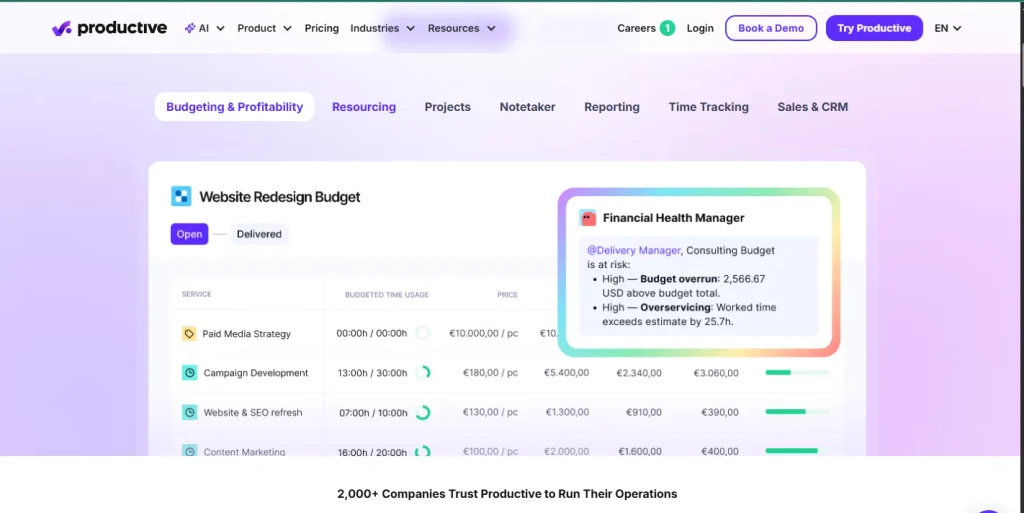
Productive is a professional services automation platform designed for agencies, service-based organizations, and consultancies. It supports project budgeting, time tracking, expense management, reporting, and financial information.
Why Project Managers Picked Productive Software:
Productive software helps businesses understand the financial performance of client projects. Project managers can create budgets, track expenses, monitor time, review project costs, and evaluate profitability. It also helps you understand how planned and actual work affect project margins.
Productive Software Standout Features and Integrations:
Features include project budgeting, actual cost and expense tracking, time and labor cost tracking, resource planning, project profitability reporting, financial forecasting, budget spending warnings, purchase orders, and invoicing.
Integration includes GitHub, QuickBooks, HubSpot, Stripe, Notion, WP, Google Calendar, Xero, JIRA, and Slack.
Productive Software Pros and Cons:
Pros:
- Connects project delivery with financial performance
- Useful for tracking project budgets and profitability
- Combines time tracking and expense management
- Provides resource planning capabilities
- Supports financial forecasting on applicable plans
Cons:
- More specialized for service-based businesses
- May be unnecessary for teams that only need basic task management
- Advanced financial capabilities depend on the selected plan
- Users need accurate time and expense information for reliable reports
Productive Software Pricing:
- Essential: $10 per user/month (Total $ 100/month for 10 users)
- Professional: $25 per user/month (Total $250/month for 10 users)
- Ultimate: Contact sale
Procore Software

Procore is a construction management platform designed to connect project teams, contractors, owners, and other construction stakeholders. It also supports construction workflows, including project financials, budget management, and cost-related documents.
Why Project Managers Picked Procore Software:
Construction projects involve several cost categories, including labor, equipment, materials, and change orders. Managing them in spreadsheets can make it hard to keep financial information accurate. Procore helps project managers manage financial workflows and maintain visibility into project costs.
Procore Software Standout Features and Integrations:
Features include budget tracking, commitment management, change order workflows, project cost documentation, financial reporting, and construction project collaboration.
Integrations include Oracle NetSuite, QuickBooks connector, Sage, Workday, MRI, and more.
Procore Software Pros and Cons:
Pros:
- Designed for construction project workflows
- Supports project financial coordination
- Helps organize budget and commitment information
- Connects project stakeholders and documentation
- Useful for managing construction projects
Cons:
- May be too specialized for non-construction projects
- Implementation may require organizational planning
- Pricing is not generally presented as a simple public per-user subscription
- Organizations should evaluate its integration and financial workflow requirements
Procore Software Pricing:
- Provides customized pricing based on the organization’s requirements and construction operations. Contact its sales team for a quotation.
Quick Comparison of the Best Project Cost Management Software
Why Is Project Cost Management Software Important?
Project cost management software is essential because it enables managers to plan, monitor, and control project expenses effectively. Here are some key reasons why it’s important:
- Budget accuracy: Project managers can keep their projects within budget by monitoring costs in real time, which helps prevent cost overruns by allowing for the early detection of financial issues.
- Improved financial planning: Cost management software provides detailed cost estimates for labor, materials, and overhead, which helps forecast future expenses and enhance financial decision-making.
- Increased profitability: By controlling costs effectively, project managers can increase project profitability, which helps maintain competitive pricing while maximizing revenue.
- Resource optimization: By utilizing cost management software, project managers can allocate resources effectively to reduce waste, thus uncovering cost-saving opportunities without compromising quality.
- Enhanced reporting and compliance: Cost management software can generate detailed financial reports for stakeholders and auditors, ensuring compliance with financial regulations and industry standards.
- Better decision-making: Cost management software offers real-time financial data, enabling project managers to make informed decisions and helps compare actual vs. planned costs to adjust strategies accordingly.
- Risk management: By utilizing cost management software, project managers can identify financial risks early, allowing for proactive mitigation and minimizing the likelihood of project delays due to budget constraints.
FAQs
What is the best free project cost management software?
ClicKUp, Asana, and Wrike offer free options, but their financial capabilities may be limited or require customization. A free plan may be sufficient for small projects with simple budgets. However, teams that require advanced financial reporting, automated forecasting, or detailed cost controls may need a paid subscription.
What features should project cost management software have?
- Project budgeting
- Cost estimation
- Actual expense tracking
- Cost variance analysis
- Cost forecasting
- Financial reporting
- Accounting integration
- Resource and labor cost tracking
The project manager should choose features according to the project’s requirements rather than purchasing the most expensive software.
Conclusion
Cost management is a vital aspect of project management. Therefore, as a project manager, you can utilize cost management software such as Scoro, Microsoft Project, ProjectManager, Smartsheet, Wrike, Monday.com, Asana, ClickUp, Productive, and Procore. However, when selecting project cost management software, you should identify your project’s cost management needs, evaluate essential features, consider software integration, assess usability and scalability, compare pricing and ROI, analyze security and compliance, read reviews, and test the software.